
Bomb Farm Controls
Pin the overlay, play with mouse or keyboard, and leave Battle running.
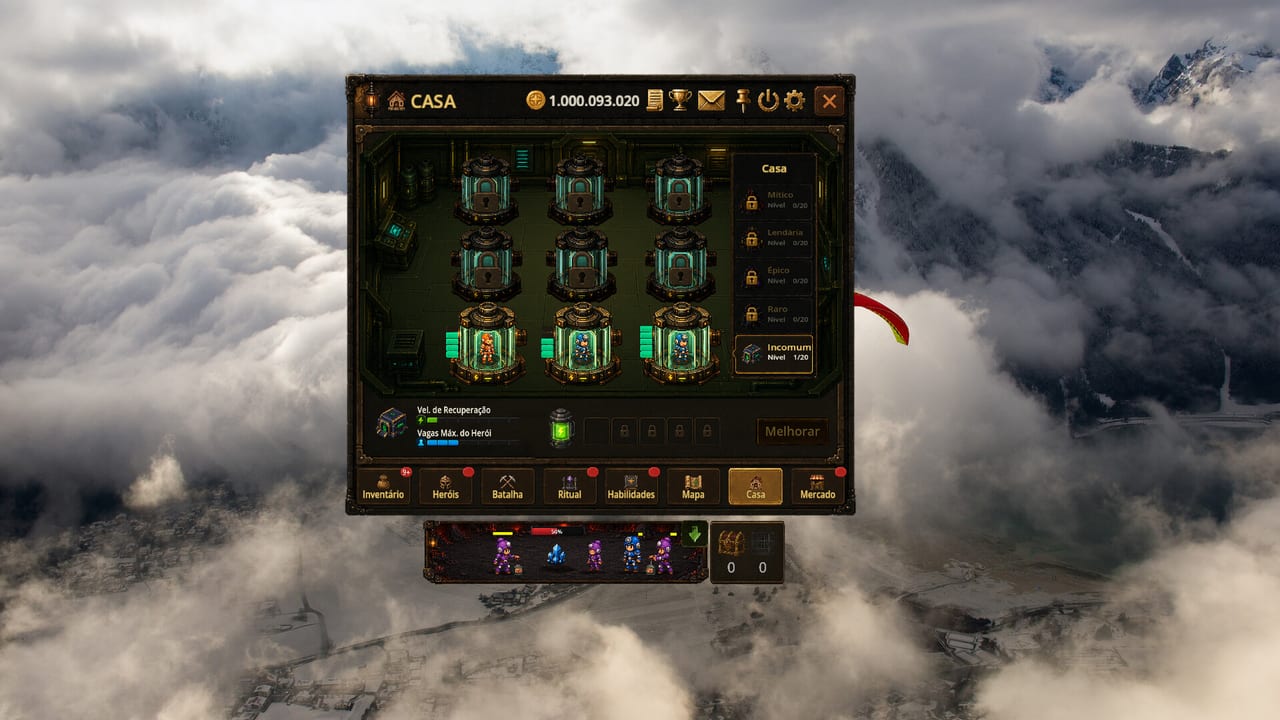
Bomb Farm is built as a compact Godot client that sits on top of the desktop. Steam tags it with mouse-only, keyboard-only, custom volume, stereo sound, save anytime, playable at your own pace, and playable without timed input. Those tags are the control scheme. This page translates them into the window you actually click.
If you have not launched the game, read Getting Started first. If you already know the tabs, How to Play is the loop; this page is the window chrome.
The overlay window
The client is a framed window, not a exclusive-fullscreen canvas. A hang-glider flourish on the side of official screenshots is cosmetic; the useful chrome is at the top right: documents, trophies, mail, pin, settings, and close. Pin keeps the window above your browser or editor so Battle can run while you work. Launch reviews treat that as the default lifestyle for the game.
Drag the window to a corner. Resize it until the grid in Battle stays readable. You do not need a second monitor, but a second monitor makes the overlay feel like a dedicated taskbar gadget.
Volume lives in settings. Steam lists custom volume controls, so you can mute Battle chimes without muting the rest of Windows.
Mouse-only play
Steam’s mouse-only option means every tab, slider, and Map node can be reached with a pointer. In practice:
- Left click selects tabs along the bottom (Inventory through Market).
- Left click on Map zones and difficulty stars chooses the next Battle.
- Left click on House capsules inspects a hero and the Melhorar / upgrade control.
- Left click in Ritual picks the blacksmith, altar, or gem row.
- The dock under the window accepts clicks to inspect the active squad.
There is no precision kiting in normal Battle. You are not tracing skill shots. If a click target is tiny, zoom the overlay or bump Windows scale; the grid itself does not require 400 DPI.
Keyboard-only play
Steam also lists a keyboard-only option. Use it if you want the overlay to stay put while your mouse lives in another app. Expect Tab or arrow navigation across the eight rooms, Enter to confirm Map and Ritual choices, and Escape to close nested panels. Because Stream On can still move focus order in a patch, treat this as a support path, not a speedrun path. If a menu traps focus, click once with the mouse and file it as a client bug — do not smash keys into the Battle grid; Battle is not a WASD action game.
Save anytime and playable-without-timed-input are the more important keyboard facts. You can Alt-Tab out mid-stage. The one exception is whatever challenge feeds the Beat the Clock achievement; that is a badge, not the default Map clear. See launch notes.
Battle inputs you do not need
You do not steer each bomber. You do not place bombs by hand on the grass. The squad AI walks the grid, pops rocks, and collects veins. Your job is composition and recovery, documented on hero roles and energy. If you sit on Battle waiting to click a special, you are playing a different genre than the one Stream On shipped.
Settings worth opening on day one
- Pin on, so a browser fullscreen does not bury the mine.
- Cloud saves on, because the overlay will close when you reboot.
- Volume low enough that resin pops do not train you to mute the whole PC.
- Language: the Steam build ships English, Portuguese (Brazil), Spanish, and Simplified Chinese. This wiki covers English, Spanish, and Brazilian Portuguese.
Family Sharing is enabled on the store. If two people share a library, still keep BombFarm accounts separate. The developer has posted about multi-account abuse on the Market; sharing a library is not the same as cloning a farm. Read Steam Market before you experiment.
Accessibility, honestly
Play-at-your-own-pace is real. Timed input is not required for Map bars. Color on the grid (green grass, ore purple, resin labels) is readable, but we do not claim a dedicated color-blind mode until the client lists one. If you need larger UI, use Windows scaling rather than a community patch.
The system requirements page covers integrated GPUs. If the overlay stutters, drop other fullscreen games, not Battle quality — there is little quality bar to turn.
Once the window behaves, go back to the How to Play loop and let the squad work. Controls are a solved problem; House capacity is not.
Frequently Asked Questions
Quick answers to the most common questions.
Can I play Bomb Farm with only a mouse?
Yes. Steam lists a mouse-only option. Tabs, Map, Ritual, and House are click targets; Battle does not need twitch clicks.
Can I play Bomb Farm with only a keyboard?
Yes. Steam lists a keyboard-only option. Use it to keep the pointer in another app while you change tabs.
Does Battle require timed inputs?
Normal Map clears do not. Steam tags the game as playable without timed input. Beat the Clock is an achievement, not the default loop.
How do I keep the window on top?
Use the pin control in the header. That is the overlay posture the getting started guide assumes.